
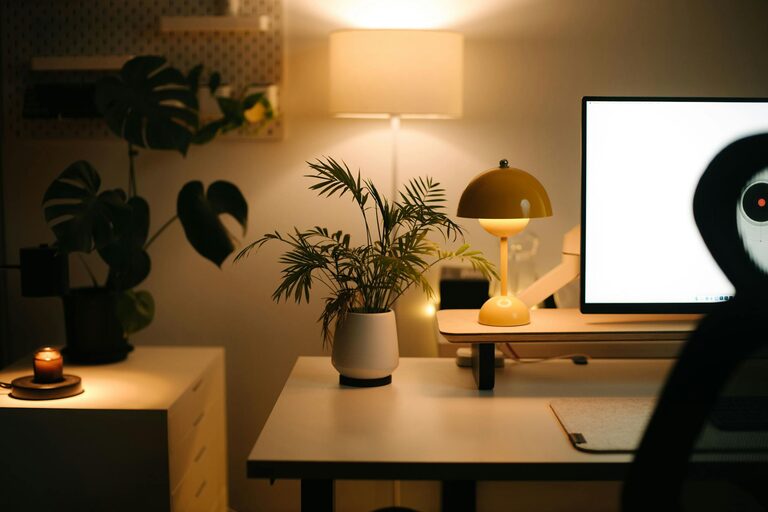
Creating a cozy and productive home workspace is essential for anyone who spends significant time working from home. A well-designed workspace can boost focus, increase efficiency, and make your workday more enjoyable. Whether you have a dedicated room or a small corner in your living space, there are several ways to make your home office both comfortable and functional.
Choose the Right Location
The first step in creating an ideal home workspace is deciding where to set it up.
– Quiet Area: Aim for a quiet corner away from high-traffic areas to reduce distractions.
– Natural Light: Try to position your desk near a window; natural light can improve mood and reduce eye strain.
– Space Consideration: Ensure there’s enough room for your desk, chair, and any essential equipment or storage.
Even if space is limited, a small nook or a section of your living room can be transformed with the right setup.
Invest in Comfortable and Supportive Furniture
Your furniture choice affects both comfort and productivity.
– Ergonomic Chair: Choose a chair that supports your back and promotes good posture. Adjustable features like seat height and armrests are a plus.
– Appropriate Desk Height: Your desk should allow your arms to rest comfortably at a 90-degree angle while typing.
– Consider a Standing Desk: If possible, try alternating between sitting and standing to reduce fatigue.
Comfort helps you focus and prevents aches associated with long hours at a desk.
Organize with Purpose
A cluttered workspace can hinder productivity. Keeping your area organized helps maintain focus and creates a calm environment.
– Declutter Regularly: Remove unnecessary items from your desk daily.
– Use Storage Solutions: Drawer organizers, shelves, or filing cabinets help store materials neatly.
– Cable Management: Keep cords tidy with clips or cable organizers to avoid distractions.
– Desk Essentials: Only keep frequently used items within arm’s reach to reduce searching for supplies.
An organized space sets the tone for an efficient work routine.
Enhance Lighting for Comfort and Focus
Proper lighting is crucial in a home workspace.
– Natural Light: Maximize daylight exposure, but reduce glare with curtains or blinds.
– Task Lighting: Use a desk lamp with adjustable brightness for focused work.
– Ambient Lighting: Combine overhead lights with softer lights for a balanced environment, especially if you work in the evening.
Good lighting reduces eye strain and helps maintain alertness.
Add Personal Touches for Coziness
Personalizing your workspace can make it more inviting and enjoyable.
– Plants: Small indoor plants can improve air quality and add a touch of nature.
– Artwork and Photos: Adding visual elements that inspire you can make your workspace feel welcoming.
– Textiles: A cozy rug or a comfortable cushion adds warmth.
– Aromatherapy: A subtle diffuser with calming scents can enhance comfort (ensure it doesn’t distract).
A space that reflects your personality motivates you to spend more time there.
Minimize Distractions
Creating an environment conducive to work requires minimizing interruptions.
– Noise Control: Use noise-canceling headphones or soft background music if necessary.
– Set Boundaries: Communicate your work hours to household members to avoid disruptions.
– Limit Digital Interruptions: Use apps or settings that block non-essential notifications during work time.
Reducing distractions helps you maintain focus and get more done.
Establish a Routine and Break Area
Even the best workspace benefits from good habits.
– Create a Schedule: Designate specific work hours to build consistency.
– Take Breaks: Step away from your desk regularly to rest your eyes and move around.
– Separate Workspace from Relaxation: If possible, avoid working in spots meant for rest, like the bed or sofa.
A balance of work and rest improves productivity and wellbeing.
Use Technology to Stay Organized
Leverage tools designed to help remote workers stay on track.
– Task Management Apps: Tools like Trello, Asana, or Todoist can keep your projects organized.
– Calendar Apps: Schedule meetings and deadlines to manage time effectively.
– Cloud Storage: Save documents to services like Google Drive or Dropbox for easy access anywhere.
Technology makes managing tasks and files smoother in a home workspace.
Keep Air Quality Fresh
A well-ventilated workspace supports comfort and alertness.
– Open Windows: When weather allows, fresh air circulation improves mood.
– Air Purifiers: Consider using one if you work in a space with poor ventilation.
– Humidity Control: Use a humidifier or dehumidifier to maintain a comfortable environment.
Good air quality helps prevent fatigue and keeps you focused.
—
By combining these tips, you can create a home workspace that balances coziness with productivity. With thoughtful furniture, organization, lighting, and personal touches, working from home can become both comfortable and efficient. Remember, your workspace should support your workflow and wellbeing, so feel free to adapt these suggestions to fit your unique needs and preferences.